
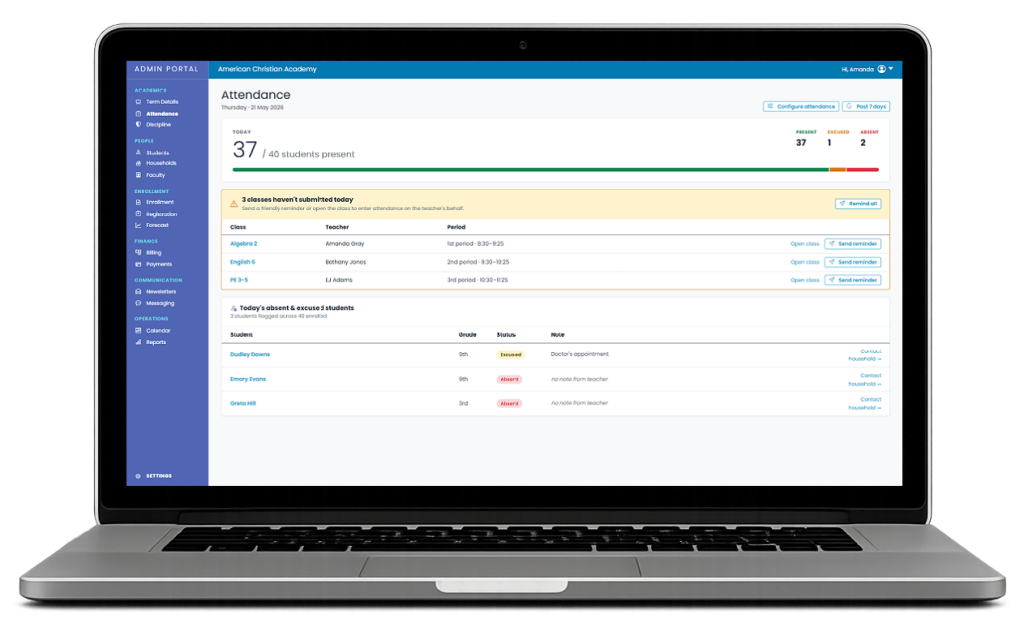
A small Christian school needs dependable administration, but it does not need software designed around a district office, a large IT team, or layers of specialized staff. School Central brings enrollment, student and family records, tuition billing and payments, attendance, grading, report cards, and parent communication together in one connected place.
It is built for the school where a principal, pastor, secretary, or teacher may carry several of those responsibilities—and where software should reduce administrative burden instead of creating a new system to manage.
A practical definition: A student information system, or SIS, is the shared operational record a school uses to keep student, family, enrollment, academic, attendance, billing, and communication work connected.
What changes when your school has fewer than 100 students?
Small schools are not merely large schools with fewer names on the roster. They usually have fewer administrative roles, less time for configuration, and more overlap between ministry, classroom, and office responsibilities. A system that can technically handle thousands of students may still be a poor fit for a school of 30, 60, or 90.
The better evaluation question is not “How many features does this system have?” It is “Will this help the people we actually have complete the work we actually do?”
- Can one administrator see what is complete, missing, or overdue?
- Can teachers complete daily work without navigating administrator-level complexity?
- Can families find the information they need without calling the office?
- Can accepted application information become the working student and family record?
- Can the school implement the system without a dedicated IT department?
One dependable student and family record
Disconnected forms, spreadsheets, email attachments, paper files, and accounting notes create competing versions of the same information. A parent updates an address in one place, but the old address remains somewhere else. A new student is accepted, yet the office must type the same information into several systems.
A useful SIS gives the school a clear source of truth. Student and household information can support enrollment, classes, billing, attendance, academic reporting, and family access without treating each workflow as an unrelated project.
The recurring work School Central brings together
| Area | The small-school question |
|---|---|
| Admissions & enrollment | Can we see every application, document, interview, and status—and carry accepted information forward? |
| Student & family records | Do authorized staff know which record is current and where to find it? |
| Attendance | Can teachers enter attendance quickly and can an administrator see what is missing? |
| Grades & report cards | Can teachers record progress while administrators maintain school-wide visibility? |
| Tuition billing | Can families understand charges, payments, balances, and online payment options? |
| Parent communication | Can families use one consistent place for the information the school needs to share? |
Clear access for administrators, teachers, and families
Different people should see the work that belongs to them. Administrators need school-wide visibility. Teachers need a focused place for classes, attendance, and grades. Parents need appropriate access to balances, forms, grades, calendar information, and school communication. Role-appropriate access reduces both confusion and unnecessary exposure of sensitive information.
Implementation without an IT department
For a small school, implementation is part of the product. The system can only help if current records are organized, settings reflect school policy, staff understand their responsibilities, and families know where to go.
School Central currently provides hands-on configuration, current-record setup, staff training, and direct launch support. That approach is designed for schools that need a practical partner, not another software project assigned to an already overextended administrator.
Transparent pricing based on enrollment
School Central publishes enrollment-based monthly pricing, with current tiers for schools of up to 25 students, 26–50 students, and 51–100 students. Current access includes all available modules, with no annual contract.
Review current pricing and implementation details on the School Central pricing page.
When School Central may be a good fit
- Your school serves 100 or fewer students.
- One or two people carry several administrative responsibilities.
- You want enrollment, records, billing, attendance, grades, report cards, and communication connected.
- You value transparent pricing, hands-on setup, training, and direct support.
- You want to replace paper, spreadsheets, forms, or disconnected systems with a clearer operating process.
When it may not be the right fit
- Your school needs enterprise-scale district administration or highly specialized integrations today.
- You require a capability that is not currently in production and cannot wait for future development.
- You prefer a mature system with a much broader feature catalog, even if it brings additional complexity.
A walkthrough should test fit honestly. The goal is not to sell a school software that does not meet its needs; it is to determine whether School Central will reduce administrative burden in that school’s actual environment.
A practical SIS evaluation checklist
- List the administrative processes that currently consume the most time.
- Identify every place student or family information is duplicated.
- Separate required capabilities from features that merely sound impressive.
- Have the actual administrator, teacher, and parent users evaluate their workflows.
- Confirm pricing, payment processing, implementation, support, exports, and contract terms.
- Ask how current records will be moved and how the school can retrieve its data later.
- Test one complete path—from inquiry or enrollment through daily administration and reporting.
See whether School Central fits your school
School Central is currently accepting a limited number of small Christian schools for implementation. A practical walkthrough can focus on your present process, your biggest administrative burden, and the capabilities you genuinely need.
See how School Central works, review the Woodin Valley Christian School case study, or request a walkthrough.
Frequently Asked Questions
What does SIS mean?
SIS means student information system. In a small school, it is the connected record and workflow used for student, family, enrollment, attendance, academic, billing, and related administrative information.
Does a school under 50 students need an SIS?
Not every small school needs the same system. An SIS becomes valuable when duplicated records, manual follow-up, billing confusion, missing attendance or grades, or staff turnover create avoidable risk and workload.
How much does School Central cost?
School Central publishes monthly enrollment tiers for schools up to 100 students. Because pricing and included services can change, use the current pricing page as the authoritative source.
Can School Central replace every tool a school uses?
That depends on the school’s requirements. School Central connects core administration, but a school should verify every required capability and integration before changing systems.
How long does implementation take?
Timing depends on record quality, school calendar, configuration, and staff availability. A walkthrough can identify the realistic scope and launch path for a particular school.
Less paperwork. More time for ministry.
School Central brings enrollment, billing, attendance, grades, records, and parent communication together in one dependable platform built for small Christian schools.